
Public
No scopesThe storefront-facing reads any shopper could make anyway, plus guest order creation.
- list_products
- get_category
- get_shipping_rate
- create_order
It runs at mcp.orderain.com. Paste that one URL into your AI client, add a token from your dashboard, and start asking.





One seller, one Tuesday: yesterday's numbers, a restock, and three late orders chased down. Every call below is a real tool on the server, in the order it has to run.
| Daily store task | Without MCP | With Orderain MCP |
|---|---|---|
| Add a new product | Open the dashboard, click Products, fill the form, save | Describe it once |
| Check how the month went | Open Analytics, pick a date range, read the chart | Ask, and get the comparison too |
| Move an order to shipped | Find the order, change status, paste tracking | One sentence |
| Launch a discount code | Coupon form, rules, category restrictions, dates | "15% on candles this weekend" |
| Find low stock across warehouses | Inventory report, filter, cross-reference by hand | The assistant reads every warehouse and sorts them |
The same three writes the dashboard makes, from one sentence. Every call is a tool the token allows, and nothing else.
orderain-mcp connected Claude
 Add our new Ember candle, $34, and put it live.
On it, creating the product now.

add_productEmber No. 04 createdupdate_inventory24 in stockupdate_product_statuspublishedEmber No. 04 is live at $34 with 24 in stock.
Nothing to install, no package to keep updated, no process running on your machine. The server is hosted and stays at the same address.
https://mcp.orderain.com/mcp Send the token as a bearer header, or as ?token= on that URL if your client has no header field. Treat the token URL like a password: it works until you revoke the token.
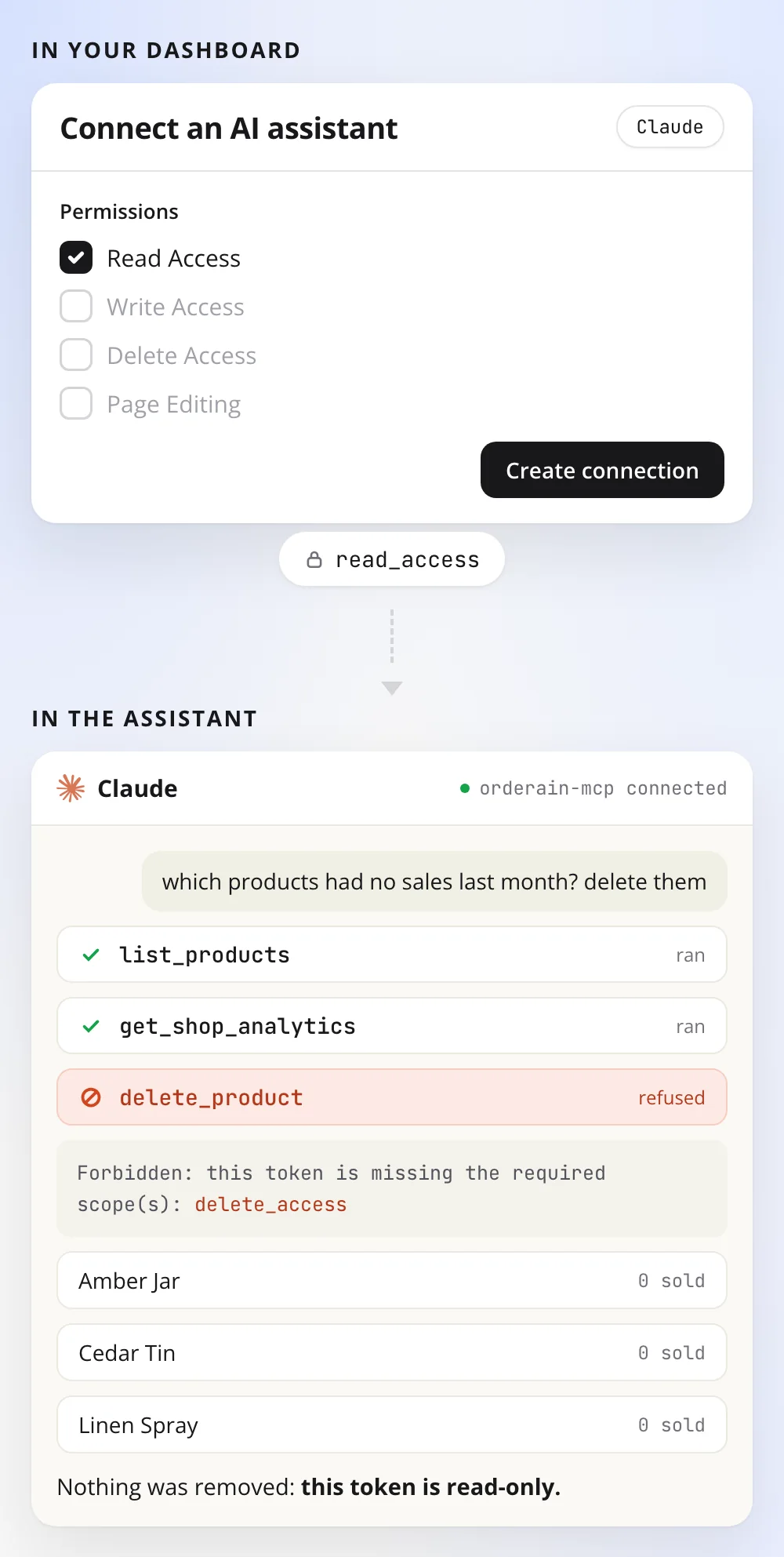
Scopes are set when you create the token, not by the assistant. Issue a read-only token and no amount of prompting will write anything.
The storefront-facing reads any shopper could make anyway, plus guest order creation.
The owner view: stock levels, analytics, settings, reviews and coupons as configured.
Anything that changes the shop. Withhold this scope and the assistant can only look.
Kept separate on purpose, so you can grant edits without granting removals.
The assistant calls the analytics tool for you and reads the numbers back in a sentence.
Not a demo surface. These are the same endpoints the dashboard uses, named so an assistant can pick the right one on its own.
Run the shop from the window you already have open. No hunting through dashboard menus for the one screen you need.
A typed tool surface over the headless API, so an agent can do the work instead of you writing another integration.
Yes. It is running at mcp.orderain.com and has been since the v2 release. It is a hosted remote MCP server, so there is no version for you to install or update.
No. You create a token in your dashboard and paste one URL into your AI client. After that you manage the store by chatting in plain English. The tools are named and described for store owners, not for engineers.
No. MCP access is included in your Orderain plan. What a token can do is set by the scopes you give it when you create it, not by your plan tier.
You create a headless token in the dashboard under Settings, then Headless. Send it as an Authorization bearer header, or in the URL query if your client has no header field. Anyone holding that URL holds the token, so revoke it in the dashboard if it leaks.
Any client that speaks the Model Context Protocol and can reach a remote server. That includes Claude.ai as a connector, Claude Desktop, Claude Code, Cursor, ChatGPT and Gemini.
Only if you gave the token delete_access, which is a separate scope from write access. Issue a read-only token and no amount of prompting will change anything. The Orderain API re-checks the scopes on every call regardless of what the assistant tries.
No. One deployment serves every shop, but the shop is taken from the token you supply, and the API verifies the token matches that shop on every call. A token only ever reaches its own store.
Buddy is the AI agent inside Orderain, so you chat with it in the Orderain dashboard. The MCP server is the reverse: it puts Orderain inside other AI clients, so you can run the store without opening Orderain at all. They work fine together.
Create a store, generate a headless token, paste one URL into your AI client. Zero% platform fees, always.